

#059 - Jupyter Notebooks vs. Scripts: Which? Why? When?
Bridging the Gap Between Iteration and Automation in Structural Engineering

There are typically two schools of thought when it comes to doing engineering work in Python. And like many things in today’s society, these viewpoints can be extremely polarizing. So, let us continue this grand tradition of absolutism, plug our fingers firmly in our ears, and explore both extremes, if only to gain a broader view of the pros and cons of each.

Both approaches, Jupyter Notebooks and scripts, are useful, provided they are applied in the right circumstances. But to summarize the debate in the simplest possible terms:
Jupyter Notebooks excel when the problem is exploratory, the data evolving, and the process iterative—almost like a documented record of thought. If you’re testing assumptions, visualizing data, or trying to understand a design space, Notebooks allow you to experiment freely while keeping a running log of insights. Read more about the nuts and bolts of jupyter notebooks here:
Python Scripts, on the other hand, shine when the problem is well-defined, the workflow repeatable, and the inputs structured. If you know exactly what needs to be done and want efficiency, automation, and maintainability, scripts are the way to go. They’re ideal for tasks like gluing processes together, automating reports, or integrating multiple software tools into a single workflow.

To make this more tangible, here’s how I personally use them:
Jupyter Notebooks are my primary tool when I’m dealing with unique, case-specific engineering problems. Often, the problem isn’t generic or repeatable enough to justify a script. Instead, I need an environment where I can explore, iterate, and document my reasoning as I work through a complex challenge. This encompasses a lot of my design work on energy projects.
Python Scripts become indispensable when I need to streamline workflows and automate processes. For example, I recently wrote a script for a colleague, Scott, who is visually impaired. The script runs from a simple batch file on his desktop, automatically launches a virtual environment, connects to a secure version of GPT-4, and copies the model’s output to his clipboard so he can use it seamlessly in his workflow. For more info on how Scott works, check out this podcast episode we recorded, his memory and recall constantly amazes me:

Jupyter is for discovery. Scripts are for execution. But let’s dig into the details, and perhaps bring some clarity to this ongoing and spirited debate.
Jupyter Notebooks: An Interactive Playground for Engineering Ideas
What It Is
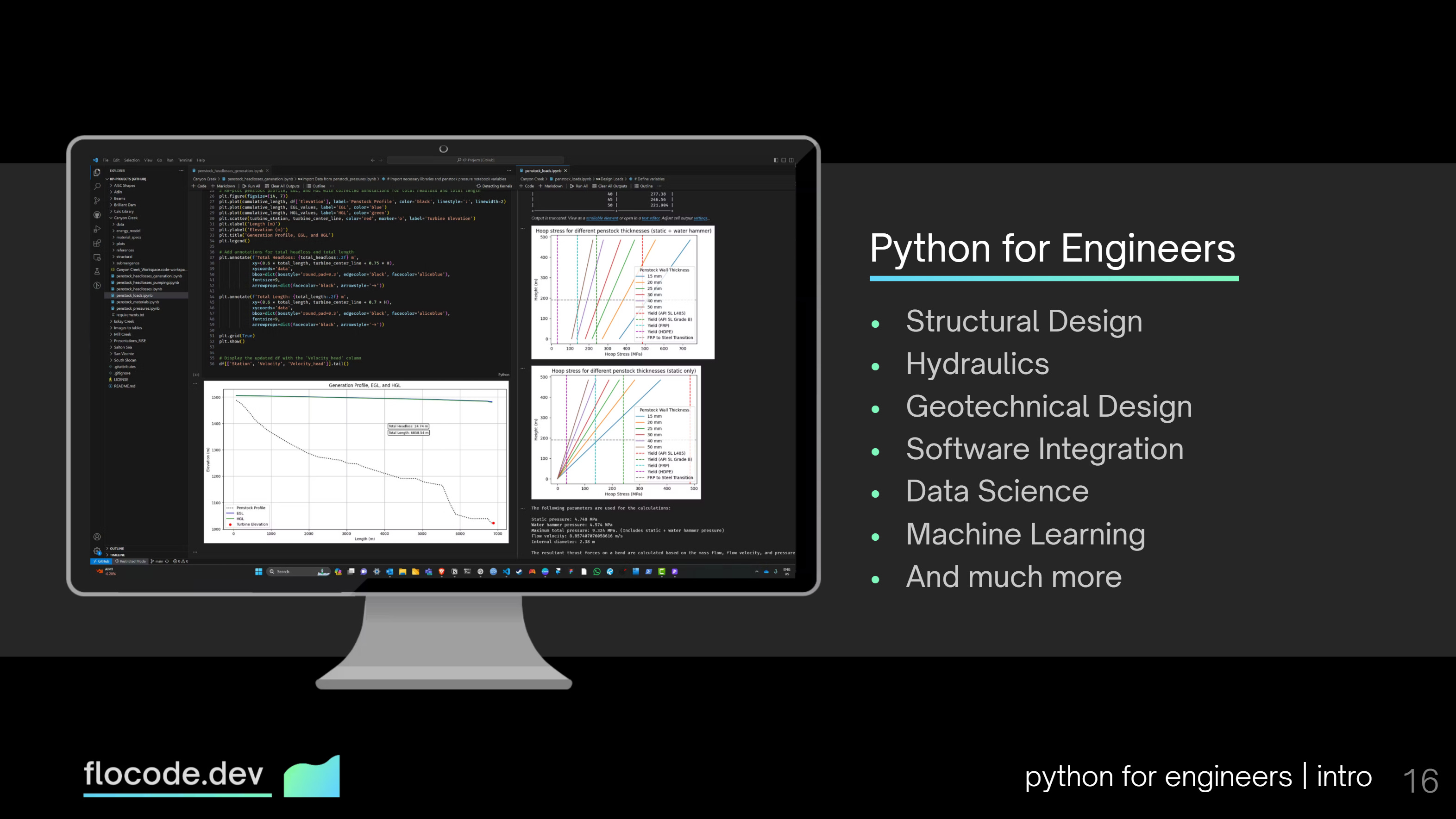
Jupyter Notebooks provide an interactive, cell-based computational environment where you can blend code, visualizations, markdown text, and equations into a single workflow. It’s an essential tool for iterative exploration, engineering research, data analysis, and documentation-heavy work.
To call it a tool for Data Scientists is reductionist. It’s a tool for engineers trying to solve complex problems.
When to Use It
Exploratory Analysis – If you’re analyzing FEA results, stress distributions, or hydrologic data, a notebook is ideal.
Prototyping and Debugging – Quick testing of beam design calculations or soil settlement models without needing to rerun entire scripts.
Visualization – Graphs, plots, visualizations, and interactive widgets can be easily created and modified.
Automating Reports – Combine Python-based calculations with markdown documentation to generate clear, organized reports or calculation packages.
Pros
✅ Interactive Execution – Run code piece by piece rather than executing an entire script.
✅ Rich Visual Output – Inline charts, tables, and images make analysis results easier to interpret.
✅ Reproducibility – A self-contained document with code, outputs, and design notes.
✅ Supports Multiple Languages – Not just Python—supports MATLAB (via Octave Kernel), Julia, and more.
✅ Perfect for Engineering Workflows – Iteratively developing customized structural models, automating calculations etc.
Cons
❌ Not Really Suitable for Production – Code in notebooks can be messy and lack structure.
❌ State Confusion – Variables persist between cells, leading to execution order issues. (This only becomes a problem in highly structured workflows. I think people overexaggerate this issue.)
❌ Hard to Integrate with Large-Scale Projects – Notebooks aren’t naturally suited for automated engineering workflows or CI/CD deployment.
❌ Version Control Challenges – Git doesn’t play nicely with notebook JSON formats.
Python Scripts: The Foundation of Scalable and Maintainable Code
What It Is
A Python script is a .py file containing structured, executable Python code. It runs in a single pass from top to bottom, making it a preferred choice for automation, application development, and integration into structural analysis workflows.
When to Use It
Automating Post-Processing – Extract deflections, reactions, and internal forces from SAP2000, Ansys, or other analysis tools. See Selenium.
Automating Reports – Convert analysis outputs from FEA tools, excel or Python to engineering reports. Check out ReportLab and Jinja2 for this.
Structural Design Optimization – Automate the iterative process of section optimization per your local design code. See structuralcodes.
Integration with Engineering Software – Scripts are easier to integrate with SAP2000, Ansys, Revit, Rhino/Grasshopper, and Tekla. Check out the following useful libraries:
comtypes: CSI SAP2000 and Etabs manipulation. PyPI - comtypes
PyAnsys: Many Python packages for using Ansys. PyAnsys Docs
PyTekla: A thin Python wrapper around the .NET Tekla API. PyTekla Docs
Pynite: Simple finite element analysis. Pynite docs
OpenSees: Finite element tasks. OpenSees Docs
pyautocad: COM for controlling Autocad. pyautocad Docs
FreeCAD API: Scripting and extending FreeCAD capabilities. FreeCAD Docs
Pros
✅ Structured and Modular – Encourages maintainable, reusable, and well-organized engineering workflows.
✅ Better for Large Projects – Scales well with multiple ongoing projects.
✅ Easier for Version Control – Git tracks changes efficiently, unlike Jupyter.
✅ Integrates with Engineering Systems – Ideal for batch processing FEA results or automating parametric designs.
Cons
❌ No Built-in Interactivity – Unlike Jupyter, you can’t execute code incrementally.
❌ Less Visual – Debugging requires extra steps to plot structural data.
❌ Longer Iteration Cycles – Requires rerunning the entire script for small changes.
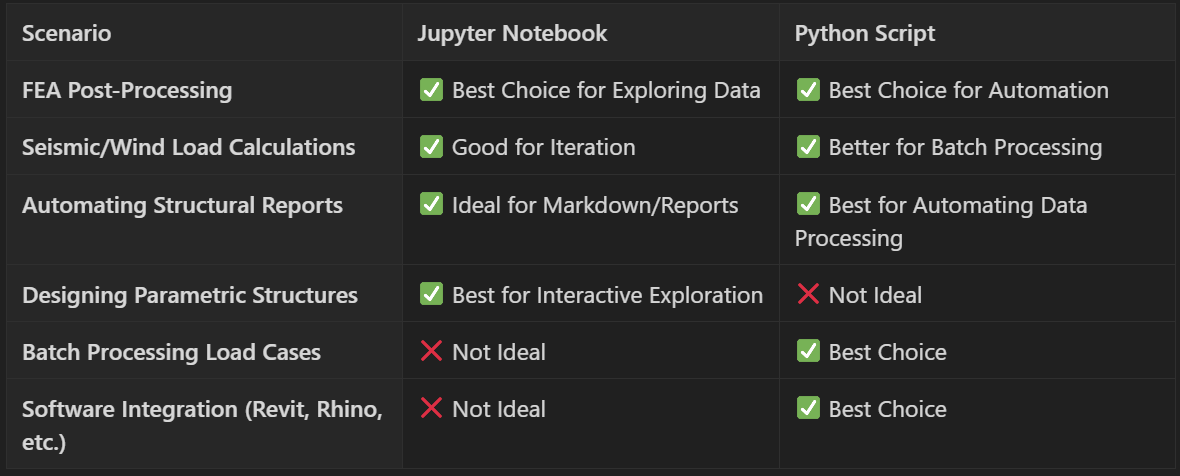
When to Use What?
Final Thoughts
Neither tool is superior, each is optimized for different engineering workflows and objectives.
Jupyter Notebooks are excellent for iterative design exploration and visualization, while Python Scripts excel in automation, deployment, and structural calculations at scale.
Experiment with both and keep innovating.
See you in the next one.
James 🌊