

#032 - Exploring Python Package and Environment Management Tools
There are so many options. Too many. Which is best?

Exploring Python Package and Environment Management Tools

Hi everyone, here I am again talking about Python environments.
Efficient package and environment management is essential for working in Python. Many different perspectives exist on how this should be handled, yet there is no official recommended approach.
This is a big deal. Understanding this and creating a smooth workflow with tools you understand will pay big dividends as you progress on your Python journey.
Up front, let’s clarify a couple of things so we’re all on the same page. Here are some important definitions.
Environment: This is the context in which Python code runs, including the interpreter and installed packages. It can be the system-wide Python installation (i.e. the global environment) or an isolated setup (i.e. a virtual environment).
Virtual Environment: An isolated Python environment created using tools like those mentioned below. It allows you to manage dependencies separately for different projects, ensuring that each project has its own specific versions of packages without affecting others or the system-wide installation. This is crucial because different packages receive updates at different times, and without isolation, updates could break your code by introducing compatibility issues.
Dependencies: Dependencies are external libraries or modules that a project requires to function correctly and often include:
Modules: A module is a single file containing Python code. It can define functions, classes, and variables and include runnable code. For example,
math.pycould be a module with mathematical functions.Packages: A package is a collection of Python modules organized in directories that provide a hierarchical namespace. To be recognized by Python, a package must contain an
__init__.pyfile. For example, a package namedmy_packagecould contain multiple modules likemodule1.py,module2.py, etc.Libraries: A library is a collection of modules and packages that provide a wide range of functionality. Libraries are typically larger and more comprehensive, often encompassing multiple packages and modules. Examples include libraries like NumPy or Scipy, which provide extensive mathematical functions.
If you want to understand more about the basics of virtual environments, check out this previous article:
#015 - Python Essentials | 02 - Python Environments Simplified
Your Options
Let’s explore some popular tools with examples and insights to help you navigate your choices.
My preferred tools are Poetry and VS Code. I also use Pyenv to deal with older libraries/packages.
venv
Overview: venv is a module that comes with Python's standard library. It is used to create lightweight virtual environments, each with its own independent set of installed Python packages.
Example Use Case: For a simple project, you can create a virtual environment with venv and install a package like pandas:
python3 -m venv myenv
source myenv/bin/activate
pip install pandas
Insights: venv is a great choice for those using Python 3.3 and newer. It’s a straightforward way to manage project dependencies without requiring additional installations. Ideal for projects that do not need the extra features provided by virtualenv.
Poetry
Poetry is my preferred choice. It streamlines project creation, dependency management, and virtual environments. Combining their functionalities into a single tool effectively replaces pip, venv, and pyenv. While it's capable of powerful package distribution, I rarely use that feature. Its core functionalities are ideal for my use cases, although there are a couple of wrinkles when working in VS Code.
Key Features:
It simplifies dependency management with a single
pyproject.tomlfile, replacing the typicalrequirements.txtfile that most are familiar with.Handles virtual environments automatically; very nice.
Facilitates publishing packages to PyPI with minimal configuration.
Example Use Case: Suppose you are starting a new project. With Poetry, you can create a new project, let’s call it ‘steel_frame_analysis’ and manage dependencies seamlessly:
poetry new steel_frame_analysis
cd steel_frame_analysis
poetry add pandas numpy matplotlib
Poetry’s approach to managing dependencies ensures that your project uses the exact versions of the packages specified. This can help avoid conflicts and issues in production environments, and this level of control is particularly useful in collaborative projects.
Insights:
According to a recent survey by JetBrains, 17% of Python developers use Poetry for dependency management, and its adoption is growing steadily. GitHub repositories using Poetry have seen a 30% increase in contributors, so it’s gaining traction.
There are some environment detection issues in VS Code that require a workaround. This is not a big deal, but it’s one of those small, silly things that grinds my gears. I know; I need to get over it.

Conda
Overview: Conda handles package management and environment creation across multiple languages, making it a good option for complex dependencies.
Key Features:
Manages packages and dependencies for Python and other languages.
Creates isolated environments with specific versions of Python and packages.
Supports binary package installation, which can be crucial for data science and machine learning projects.
Example Use Case: When starting a machine learning project that requires TensorFlow, Pandas, and scikit-learn, you can create an environment and install all dependencies with Conda:
conda create --name ml-env tensorflow pandas scikit-learn
conda activate ml-env
Insights: Conda has extensive documentation and a large active community you can check in with for help or advice on common problems. This is important for when you inevitably hit a wall.
Insights:
According to Anaconda’s 2022 State of Data Science report, 40% of data scientists prefer Conda as their environment manager.
Projects using Conda environments have reported a 50% reduction in setup and configuration time.
Anaconda’s large installation size and frequent updates can be cumbersome (this is why I ditched it, but it’s very popular for good reason).
Managing multiple Conda environments can use a lot of disk space. Remember to delete your old venvs.
Miniforge
Overview: A leaner version of Conda, Miniforge is optimized for open-source packages. It’s ideal if you want a lightweight setup without the full Anaconda suite.
Key Features:
Smaller installation size compared to Anaconda.
Focuses on open-source packages, reducing the bloat associated with commercial libraries.
Example Use Case: For a lightweight data analysis project, you can set up Miniforge and install the necessary packages:
conda create --name lightweight-env pandas seaborn
conda activate lightweight-env
Insights: Miniforge is particularly useful for users who need the power of Conda but want to avoid the bulk of the Anaconda distribution. It offers a streamlined way to manage dependencies without unnecessary overhead. I like Miniforge and think it’s a great option.
Insights:
Miniforge users report a 60% decrease in setup times compared to Anaconda.
Adoption of Miniforge has increased by 25% among users focused on open-source software.
Limited to open-source packages, which might not include all tools needed for some projects.
Pyenv
Overview: Pyenv allows you to switch between multiple Python versions, which is particularly useful when working on multiple projects over time. This benefit is not apparent until you start working with older projects or libraries or you’ve been coding for a while and begin to run into compatibility issues.
Key Features:
Installs and manages multiple Python versions.
Sets global, local, and shell-specific Python versions.
Example Use Case: When working on legacy code requiring Python 3.6 and a new project with Python 3.9, Pyenv makes switching easy:
pyenv install 3.6.9
pyenv install 3.9.5
pyenv local 3.6.9  # For the legacy project
pyenv local 3.9.5  # For the new project
Insights: Pyenv is great for maintaining compatibility across projects with different Python version requirements. It simplifies testing and development in multiple environments.
Not using it simply leads to frustration. I learned this the hard way. Over time, the time and the frustration add up. I recommend learning the basics of Pyenv sooner rather than later.
Insights:
Pyenv is favoured by 15% of Python developers, highlighting its importance in projects requiring version management.
Developers using Pyenv report a 35% increase in efficiency when switching between projects with different Python versions.
Pyenv installation and setup can be complex for beginners.
Limited to managing Python versions and does not handle package dependencies.
Virtualenv
Overview: A tool to create isolated Python environments. It's straightforward and gives you control over your environment setup without additional features.
Key Features:
Creates isolated environments to prevent dependency conflicts.
Compatible with
pipfor installing packages.
Example Use Case: For a quick scripting project, you can set up a virtual environment using virtualenv:
virtualenv myenv
source myenv/bin/activate
pip install -r requirements.txt
Insights: Virtualenv’s simplicity makes it a go-to tool for many developers. It provides a no-frills approach to environment management, ensuring projects remain isolated and dependencies are managed effectively.
Insights:
Virtualenv is used by 23% of Python developers to manage isolated environments, according to the Python Developers Survey.
Projects using virtualenv report a 28% reduction in dependency issues.
Lacks advanced features found in tools like Conda and Poetry.
Managing multiple environments can be cumbersome without additional tooling.
Pip
Overview: The default package installer for Python. Many projects use Pip directly to install dependencies. Everybody likes Pip. Easy, fast and clean.
Key Features:
Simplifies package installation from the Python Package Index (PyPI).
Integrates seamlessly with virtualenv and Pyenv.
Example Use Case: Installing the pandas library:
pip install pandasInsights: Pip’s ubiquity and ease of use make it the first tool many developers encounter. Its straightforward approach to package management ensures quick setup and deployment.
Insights:
Pip is the default choice for 70% of Python developers, reflecting its importance in the Python ecosystem.
Developers using Pip directly report a 25% increase in setup speed for small projects.
Lacks environment management capabilities found in other tools.
Dependency resolution can lead to conflicts in complex projects.
Pipenv
Overview: Pipenv combines Pip and virtualenv to simplify virtual environment creation and dependency management. It provides a straightforward and unified workflow. I haven’t tried this one but it’s popular so I wanted to include it.
Key Features:
Manages virtual environments automatically.
Resolves dependencies and generates a
PipfileandPipfile.lockfor reproducibility.
Example Use Case: For an engineering project using Numpy, you can set up your environment with Pipenv:
pipenv install numpy
pipenv shell
Insights:
Pipenv is used by 12% of Python developers, according to the Python Developers Survey by the Python Software Foundation.
Projects using Pipenv have reported a 20% reduction in dependency conflicts.
Some users experience slow environment creation and package installation times but your mileage may vary. Let us know if you have any thoughts on this.
Limited support for non-Python dependencies compared to Conda.
No personal experience/insights on this one.
Conclusion
Each tool has strengths, and the best choice depends on your needs and project requirements.
Here’s a quick summary of when to use each tool:
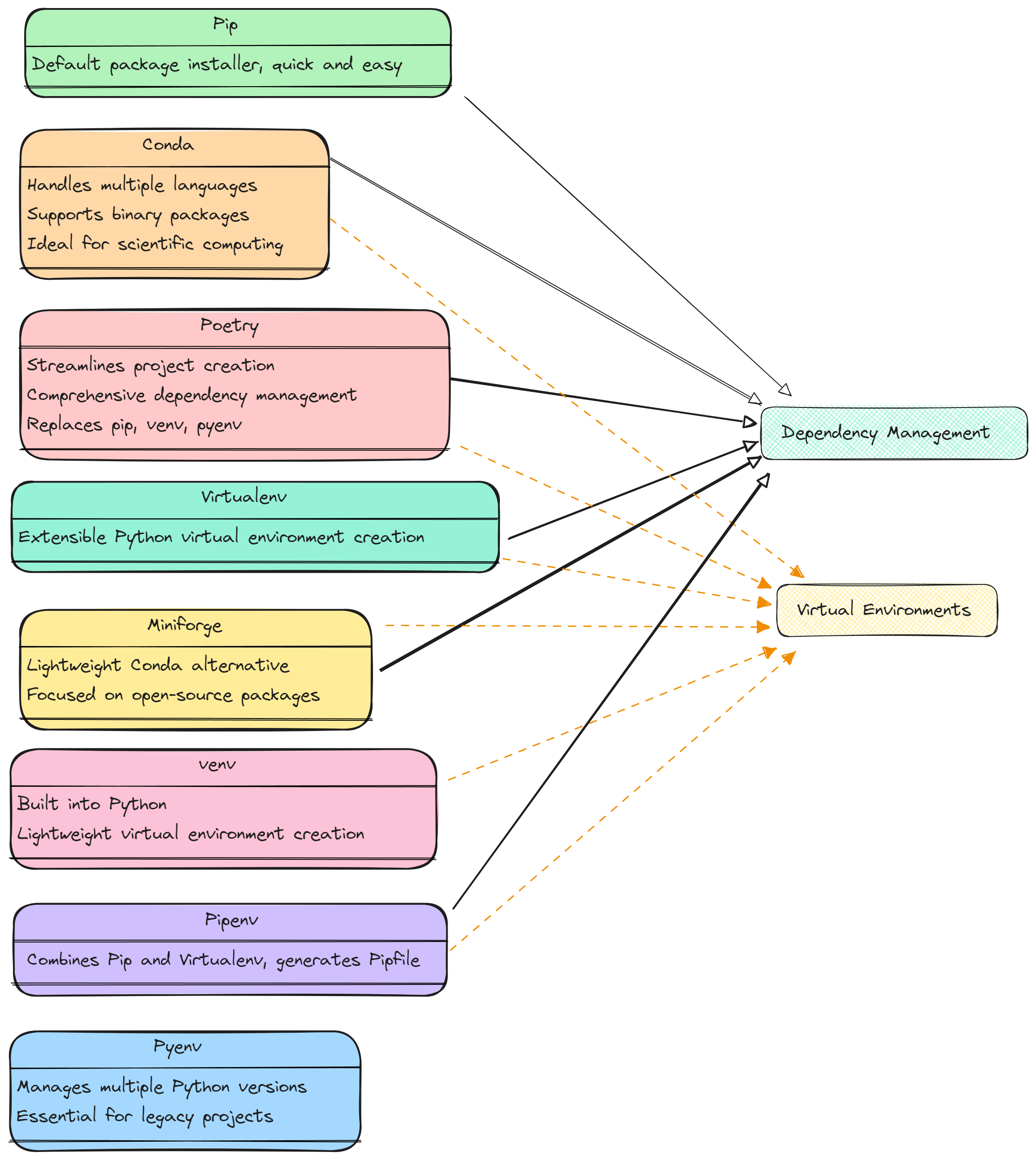
Poetry: Ideal for comprehensive dependency management and project setup. 👍
Conda: Best for scientific computing and projects with complex dependencies. Beware the bloat of Anaconda.
Miniforge: Lightweight alternative to Conda for open-source packages. 👍
Pyenv: For managing and switching between multiple Python versions.
Virtualenv: Simple and effective for isolated environments.
Pip: Quick and easy package installation.
Pipenv: Simplifies environment and dependency management for small to medium projects.
To dig even deeper, here is an excellent article from Anna-Lena Popkes that covers a few additional tools and considerations.
What tools are you using in your workflow and why? I’m curious to hear how other engineers are navigating these waters.
The Flocode Community is growing. Join engineers in 104 countries around the world learning Python with Flocode.
Greenland is still holding out. One day, they will concede.
See you in the next one.
James 🌊
#structuralengineering #civilengineering #python
do you plan to make a similar post on using docker for civil eng related projects anytime soon?
i'm having a hard time with it rn, i learn better when it's applied
welldone